How to get a Cyprus tax number (TIN) through Tax For All
Registration in the tax register is one online application in the Tax For All portal. This is what the portal asks for, which documents each category has to attach, and what happens after you press submit.
Checked against its sources on 10 September 2026
Who this is for
You need this if
- You have income that falls under article 5 of the Income Tax Law — employment, business, pension, rent, dividends, interest — and no Cyprus tax number yet.
- Your employer asks for a tax number: the registration reason is employment in Cyprus, and the required documents are different for that case.
- You are registering because of property in Cyprus: renting it out, buying, selling, or selling shares in a company that owns property.
- You are a director of a Cyprus company who has to sign the IR4 return, or a person claiming Cyprus tax residence under the 60-day rule.
- You will be a Cyprus tax resident aged 25 to 70 in tax year 2026 or later: from that year the return is due whatever your income, and a return needs a tax number.
You do not need this if
- You already have a tax number but no portal account. That is a different request — “request access to an existing taxpayer (Α.Φ.Τ.)” — and registering again would create a second taxpayer record.
- You need a residence permit, a social insurance number or GESY registration. Those are other departments; the tax register does not stand in for any of them.
- You are registering a company or a partnership: legal persons register through CY Login and a separate document list.
What to prepare
- An email address and a phone number. The account is validated by email, and the department writes to that address.
- Your identification document as a digital file, all sides — a Cypriot ID (both sides), an EU citizen’s Registration Certificate, or a residence permit. Accepted formats are the ordinary ones: .jpeg, .png, .pdf, .doc.
- If you have applied for the Registration Certificate or the residence permit but do not have it yet: the payment receipt for its issue, plus the documents listed for people without either. In the application, answer “No” to the question about holding a Cyprus ID or an ARC.
- If you have neither: one identification document from your own country — a tax registration certificate, a national ID, or a social insurance number certificate — plus a recent photograph and a letter explaining why you are registering.
- Employment in Cyprus as the reason: a letter from the employer with the terms of employment, or a stamped employment contract, or a copy of the hiring notification submitted to ERGANI showing the status “Submitted”. Your social insurance number has to be stated in the application.
- Property as the reason: for letting a property in Cyprus (to pay GESY on the rent), or for selling or transferring one, the title deed or a stamped contract of sale; for a purchase, the stamped purchase contract. For a share sale in a property-owning company, a recent share certificate.
- A foreign director registering to sign the IR4: a recent certificate of directors of the Cyprus company.
- The 60-day rule as the reason: an identification document, the letter of explanation, and for property in Cyprus a copy of the title deed, or a stamped purchase or rental contract.
Steps
- 1
Create an account in Tax For All
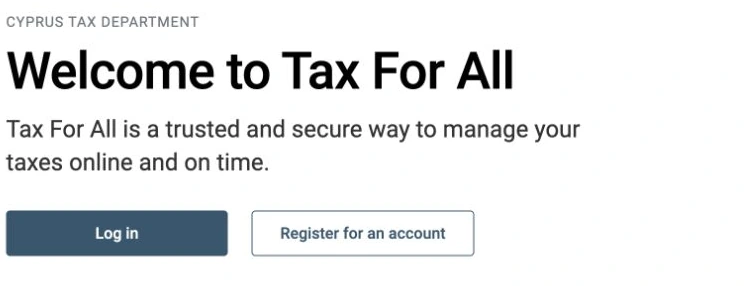
Open taxforall.mof.gov.cy and choose “Εγγραφείτε για νέο λογαριασμό”. The form asks for your full name, date of birth, telephone, email address, a username and a password of at least eight characters with an upper-case letter, a lower-case letter, a digit and a special character, and three security questions. You then activate the account from the confirmation email. If you already have CY Login credentials, you can sign in with those instead.
 Enlarge image ↗
Public Tax For All homepage: Log in and Register for an account.
English · Captured 2026-10-20
Public screen from the official website, captured without signing in or entering personal details
Open official page ↗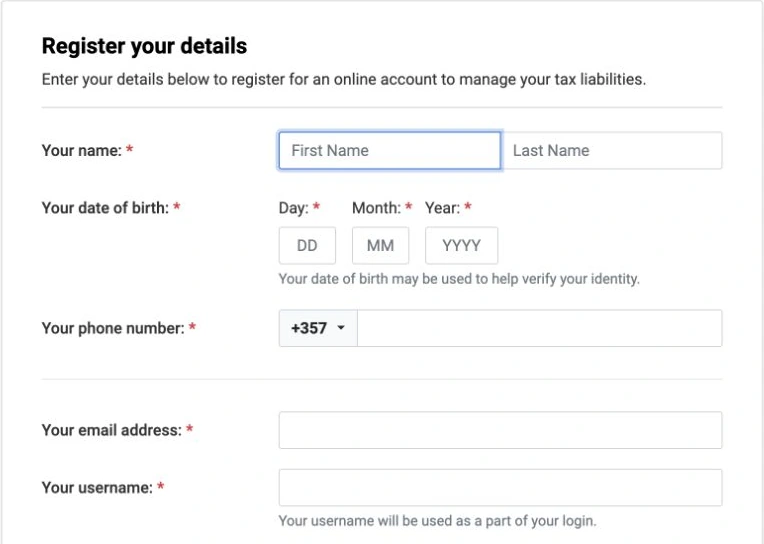 Enlarge image ↗
Tax For All account registration: name, date of birth and contact details. Empty form.
English · Captured 2026-10-20
Public screen from the official website, captured without signing in or entering personal details
Open official page ↗ - 2
Start a new registration
Signed in, choose “Να εγγραφείτε ως νέος φορολογούμενος” and “Έναρξη νέας Εγγραφής”. The account you have just made is only a portal login; it carries no tax number until this application is approved.
PracticeIf a provider or an employer once obtained a tax number for you, do not start a new registration here — the number exists and only the portal access is missing.
- 3
Choose registration as an individual
Select “Εγγραφή Φυσικού Προσώπου ως νέος φορολογούμενος”. The official guide is explicit that the person submitting must be the person being registered; there is a separate route for agents and for legal persons.
- 4
Pass the eligibility check
Have the documents ready as files before you start. Pick the category you belong to, answer the questions about your tax residence and fill in the mandatory fields. The portal then tells you whether you qualify for a tax number and which obligations follow from the category you picked, and you continue with “Συνέχεια στην εγγραφή”.
- 5
Read the application instructions
The screen before the form lists the documents required for your category in point 1, and points 2, 3 and “Σημαντικό” carry the rest of the conditions. This is the screen where the wrong category shows up as a document list that does not match your case.
- 6
Fill in your personal details
Language, the date of registration in the tax register, title, first and last name, date of birth and sex. Your identification number is carried over automatically. The names must be spelled as they are on the identification document you are attaching. The official guide asks you to open the Help on the date-of-registration field before filling it in.
- 7
Fill in the contact details
The email address comes from your portal account. You add a home address and at least one telephone number, and choose which address receives paper correspondence. A post-office box, once entered, takes all the paper post whatever you select as the main address.
- 8
Add the information about you
Occupation, community, nationality, whether you are an employer, and in what capacity you are submitting the application. The reason for registration is usually filled in automatically from the category you chose; in some cases you pick it yourself.
- 9
Add related contacts, if any apply
A director of a private company must add the related contact “Διευθυντής του/της”. Otherwise this step is skipped. Other contacts — a statutory representative, an auditor — are added here too, and each needs all its mandatory fields.
- 10
Upload the documents
Attach the documents for your category, and any further evidence that supports the reason for registration. The department reserves the right to ask for more while the request is being examined.
- 11
Submit the application
Check your answers, read and agree to the declaration, and press “Υποβολή Αίτησης”. Nothing is filed with the department until this point.
- 12
Keep the REG reference and wait
The confirmation screen shows a reference number in the form REGxxx and the department writes to your email about the progress. Processing can take up to ten days. Once the request is approved you receive an email, and your Tax For All account is linked to the new tax number automatically.
PracticeQuote the REG number in every call or message about the application: it is the only handle the contact centre has on your case.
- 13
The TAXISnet account appears by itself
For a taxpayer registered through Tax For All, the TAXISnet account is created automatically one to three working days after the registration is complete. There are exceptions: categories 92 and 93, registered for immovable property only, and category 99, an unverified taxpayer category. Someone who obtained a tax number before Tax For All existed and has no TAXISnet account has to register for TAXISnet themselves.
Time, money, deadlines
- Cost of the registration
- €0Neither the portal nor the department’s registration pages name a fee for the application.
- Processing time
- up to 10 daysStated on the portal’s confirmation screen, along with the REG reference number.
- TAXISnet account after approval
- 1–3 working daysAutomatic, except for categories 92, 93 and 99.
- Tax For All support line
- 17700 / +357 22 803803Local and international; 07:30–16:00 Monday to Friday, public holidays excluded. Technical support only: no tax information or guidance.
- By email
- hq@tax.mof.gov.cyThe department’s stated aim is to answer within five working days.
- Filing obligation from tax year 2026
- age 25 to 70, any incomeA Cyprus tax resident in that age band files a return whatever the income, so the tax number is needed before the 31 July 2027 deadline for 2026.
Where people go wrong
- Registering a second time when a number already exists. If an employer, an accountant or a provider ever registered you, ask for access to the existing taxpayer account instead — a duplicate record has to be unpicked by the department afterwards.
- Working from the English document list. The English “Required Documents for Online Registration for Individuals” is the July 2024 version: it has no employment case and no route for someone who has applied for a residence document but not yet received it. The Greek list was updated in October 2025 and is the one the office works from.
- Uploading one side of an identification document. The list asks for both sides of a Cypriot ID and all sides of a Registration Certificate or residence permit.
- A name spelled differently from the identification document. The details you type have to match the document you attach, transliteration included.
- Employment as the registration reason without the social insurance number in the application, or without one of the three accepted proofs — employer letter, stamped contract, or the ERGANI hiring notification marked “Submitted”.
- Entering a post-office box and then choosing a street address as the main correspondence address. The box wins, and the paper post goes there.
- Waiting for a letter with the number. The tax number arrives by email and the portal account is linked to it; nothing is posted to confirm it.
Anything marked “practice” is what the department does in the office, not a rule you can hold it to. Rules carry a source.
Forms and portals
- Tax For All — create an accountThe registration form itself. The portal opens in Greek; the language can be switched in the header.
- Online Registration Guides (English)The department’s own step-by-step guides for individuals, the self-employed and legal persons, plus both document lists.
- Required documents for individuals (Greek, October 2025)The current list, by category. Use this one rather than the older English version.
- Request access to an existing taxpayer (TIN)The route when the number exists and only the portal account is missing.
- Signing in to Tax For All with CY Login
- Registering for TAXISnetWho gets a TAXISnet account automatically, and how to register when you do not.
Questions
How long does a Cyprus tax number take?
The portal states that processing the registration request can take up to ten days. The confirmation screen gives you a REG reference number, and the approval arrives by email, at which point your Tax For All account is linked to the tax number automatically.
Can I register without a yellow slip or an ARC?
Yes. The document list has a category for people with neither a Registration Certificate nor a residence permit: one identification document from your own country — a tax registration certificate, a national ID or a social insurance certificate — a recent photograph, and a letter explaining the reason for registration with evidence of that reason. In the application you answer “No” to the question about holding a Cyprus ID or an ARC.
I already have a tax number but no online account. What do I do?
Do not start a new registration. Create the Tax For All account and then use “request access to an existing taxpayer (Α.Φ.Τ.)”, which links the account you have made to the tax number that already exists. Registering again creates a second taxpayer record.
Do I have to register for TAXISnet separately?
Not if your tax number came through Tax For All: the TAXISnet account is created automatically one to three working days later, except for categories 92, 93 and 99. If you obtained your number before Tax For All and have no TAXISnet account, you register yourself on the TAXISnet site — you need the tax identification code and the 17-digit unique registration number, which the department sends on request to taxisnet@mof.gov.cy.
Do I need a tax number if I have no income?
From tax year 2026 a Cyprus tax resident who is between 25 and 70 years old on 31 December of the tax year has to file a return whatever the income, and filing needs a tax number. Someone with no gross income who is under 25 or over 70 is outside that obligation.
Sources
- Tax For All — account registration screen (fields, password rules, security questions, contact centre hours)checked 10.09.2026
- Tax Department, “Διαδικτυακή Εγγραφή Φυσικού Προσώπου ως νέος φορολογούμενος” — the official step-by-step guide23.01.2025
- Tax Department, “ΦΥΣΙΚΑ ΠΡΟΣΩΠΑ — ΑΠΑΙΤΟΥΜΕΝΑ ΕΓΓΡΑΦΑ” (required documents by category)10/2025
- Tax Department, “Required Documents for Online Registration for Individuals” (the older English list)07/2024
- Tax Department, “Εγγραφή στο TAXISnet” — automatic TAXISnet accounts and the exceptions
- Tax Department, FAQ on the 2026 tax reform for individuals, questions 6 and 7 (who must file from 2026)11.05.2026
What next
This is a description of a public procedure, not advice on your own affairs. Where your case has a wrinkle, the Tax Department’s district office answers on it directly.